
Getting Started in UCAT Quantitative Reasoning: Key Formats, Mental Maths, Calculator Tips & Fast Pacing to Maximise Your Score

Introduction 📚
Quantitative Reasoning (QR) is the third subtest of the UCAT (University Clinical Aptitude Test), assessing how well you can apply numerical skills to solve problems under intense time pressure. In this section, you’ll face 36 questions in just 26 minutes (with an additional 2 minutes of instructions) – that’s roughly 40 seconds per question on average! This tight timing makes QR a challenging test of speed and accuracy, even if the maths itself isn’t extremely advanced. In fact, the level of maths required is quite basic (roughly what is taught by age 14 in school), but the difficulty lies in interpreting data quickly and performing calculations under pressure.
In UCAT QR, most questions are set in real-world scenarios, often presented with charts, tables or graphs. You’ll need to extract relevant information from these and perform quick calculations to find the correct multiple-choice answer. A simple on-screen calculator is provided, but it’s deliberately basic and sometimes slow to use, so clever use of mental maths and estimation is crucial. There’s no negative marking in UCAT, so you should attempt every question – if you’re stuck or time is running out, it’s better to make an educated guess or even a blind guess than to leave it blank.
In this comprehensive guide, we’ll walk you through the essentials of UCAT Quantitative Reasoning: the common task formats you’ll encounter, the key maths concepts (and how much maths is actually involved), ways to limit heavy calculations and avoid common errors, and tips for using mental maths versus the calculator effectively. We’ll also discuss how to pace yourself so you can answer as many questions correctly as possible within the time. Let’s get started on building your confidence and skills for UCAT QR!
QR Tasks and Formats 🔢
Unlike some other UCAT sections, Quantitative Reasoning doesn’t have clearly distinct question types – every question ultimately involves solving a numerical problem. However, we can describe common formats and tasks that you’ll see in the QR section:
Data-Driven Questions:
Almost all QR questions involve interpreting some form of data presentation. You’ll typically be given a chart, graph, table, or diagram with accompanying information, and then answer a series of questions about it. Common data formats include:
Tables: Grids of numbers with row/column labels (e.g. a price list or patient vital signs). Important details are often hidden in the headers or footnotes.
Graphs: Such as bar charts or line graphs, plotting relationships between variables. You may need to read values at certain points or compare trends.
Charts: Including pie charts or other infographics showing proportions. (Interestingly, the UCAT often refers to any chart or graph simply as a “graph”, even pie charts.)
Maps: Occasionally, you’ll see a map or schematic, e.g. requiring you to estimate distances or travel times using a given scale.
Diagrams/Flowcharts: Less common, but you might get a flowchart or process diagram that involves numerical reasoning (e.g. calculating outputs from inputs at each stage).
In official UCAT practice materials, tables and graphs are by far the most common formats, whereas maps or unusual diagrams are rare. No matter the format, the key is to quickly interpret the data and identify which numbers or relationships are relevant for the question at hand.
Sets of Questions:
UCAT QR typically presents data in sets. Usually, you’ll get a data presentation followed by four questions related to that same information. For example, one table might be used to answer four different questions. This means you should use the given data efficiently – work out any necessary figures in that set in a way that might help answer multiple questions. There is usually one group of standalone questions as well (about 4 questions each with its own brief data), but the bulk of the section is 8–9 data sets with linked questions.
Tip: It often helps to read the question before examining the data in each set. By reading the actual question first, you’ll know what you’re looking for in the table or graph. This prevents you from wasting time trying to understand all the data or context. For instance, if the question asks for a percentage increase between two specific values in a table, you can go straight to those values instead of digesting the entire table. Being selective like this is crucial because fully comprehending a complex chart or large table isn’t necessary if only a couple of numbers in it are needed for the answer.
Textual Information:
Alongside visual data, you’ll often have some textual notes or descriptions. These may include extra numbers, formulas, or conditions to apply in your calculation (for example, “prices include a 5% tax” or “use formula X = Y×Z”). Occasionally, a question might be mostly text without a big chart – like a word problem describing a scenario – but this is less common. If you see a long-winded scenario, be on the lookout for key figures or rules hidden in the text. Underline or jot down important details on your noteboard so you don’t overlook them.
Keep in mind that some data sets can look intimidating at first glance – large tables of figures or unfamiliar diagrams can spike your anxiety. Remember that every candidate faces the same challenge. The UCAT isn’t expecting you to absorb every detail; instead, it tests whether you can stay calm, pick out the relevant information, and not get bogged down by extraneous data. If you feel overwhelmed by a dataset, try the strategy above: read the question first, then extract only the data you need. Work step by step, and don’t let the visual complexity distract you from the specific task.
Key Maths Concepts and the “Amount of Maths” ✖️➗
Don’t be scared by the term “Quantitative Reasoning” – the maths itself is mostly straightforward. In fact, the concepts required correspond to basic secondary school maths (roughly Key Stage 3 level, or what most students learn around ages 11–14). You will not need any advanced A-level Maths or calculus. However, you will need to apply core GCSE-level maths very quickly and accurately in practical scenarios.
Common Maths Topics in UCAT QR: You should be comfortable with the following foundations, since they come up frequently in questions:
Arithmetic operations: Addition, subtraction, multiplication, division (including understanding of order of operations).
Percentages: Calculating percentages, percentage change, percentage increase/decrease.
Fractions and Ratios: Converting fractions to decimals/percentages and vice versa, comparing ratios, proportional reasoning (e.g. scaling up recipes or quantities).
Averages: Mean, median, mode, and range – often applied to data sets (e.g. finding an average value from a table).
Units and Conversions: Converting between units of measure (e.g., kilograms to grams, hours to minutes, currencies, etc.). Sometimes a conversion factor is provided in the question. Make sure you know common unit equivalences (e.g., 1 km = 1000 m, 1 hour = 60 minutes) so you don’t waste time on them.
Time, Money, and Temperature: Many problems involve dealing with dates/times (schedules, time intervals), currency calculations (prices, costs, profit), or temperature scales – practical everyday contexts.
Geometry basics: Areas, perimeters, or volumes of simple shapes, and possibly some interpretation of formulae (e.g. using a given formula for compound interest or distance = speed × time). You won’t be asked to do complex geometry, but knowing formulas for things like the area of a circle or the volume of a box might save you if it comes up (and these formulas might be provided in the question if needed).
Occasionally, you might find it helpful to use a bit of algebraic thinking – for example, setting up an equation from a word problem – but you won’t need to do any heavy algebra manipulation. In other words, you might denote an unknown with x to structure your calculation, but you won’t have to solve quadratic equations or anything of that sort. The focus is on numerical problem-solving, not abstract math theory.
👉 The good news: This maths is not very advanced! Most of it is fundamental stuff you use in daily life or learned in early secondary school. The challenge lies in applying these basic maths concepts quickly and correctly in novel problem contexts. So, a key skill to develop is recognising which maths concept a question requires at a glance (e.g., a percentage change problem, a speed-distance-time problem, a unit conversion, etc.). Once you identify the concept, you’ll likely know how to solve it – then it’s all about doing it fast.
The “Amount of Maths” – Gauging Question Complexity: Not all QR questions are equal in workload. Some can be answered in a single step, while others require a series of calculations. A useful strategy is to quickly estimate the amount of maths a question will involve, and use that to manage your time:
No-Maths Questions:
Believe it or not, a few questions require virtually no calculation at all – you might just read a value directly from a chart or do a very trivial operation. For example, “What were the total sales in 2023?” when a table already lists the total as one of the entries. These questions are gifts 🎁 – answer them almost immediately by extracting the number. They should take just a few seconds (definitely under 20 seconds).
Simple Calculation Questions:
These are the majority of UCAT QR items. They involve a couple of steps or a short calculation. For instance, you might have to add two numbers and then divide by a third, or find a percentage of a given value – something that can be done in a few logical steps. Aim to solve these in roughly 30 seconds or less each, through a combination of quick mental maths or efficient calculator use. Mastering this category is crucial because zipping through the simple ones buys you time for the harder ones.
Complex Calculation Questions:
A minority of questions will be more time-consuming or multi-step – perhaps involving four or more calculations, or parsing through a complex set of conditions/data. If a question looks like a lengthy word problem with several stages (e.g. a complicated financial calculation with multiple conditions, or a multi-layered rates problem), that’s a sign it’s “complex” in terms of workload.
When you encounter a potential time-sink question, don’t panic – but also, don’t tackle it immediately if it’s going to chew up your time. It’s often wise to skip these complex questions on your first pass through the section. You can flag them (mark for review) and come back later if time permits. By skipping early, you ensure you first answer all the “low-hanging fruit” (the no-maths and simple questions) within the 26 minutes. With those done, you can devote any remaining time to the harder ones you flagged. This triage strategy can dramatically improve your efficiency – rather than spending 2 minutes on one hard question and potentially missing out on 3 easier ones you never got to, you collect all the easy points first. Good pacing earns higher marks!
It might feel strange at first to leave a question unanswered and move on – but remember, every question is worth the same one mark in QR. So, maximise the number of questions you answer correctly by prioritising the quicker solves. With practice, you’ll get better at instantly judging a question’s difficulty. One approach is to quickly ask yourself: “Is this straightforward, or does it look like a lot of steps?” in the first 5 seconds of seeing a new question. If it looks straightforward, dive in and solve it now; if it looks complicated or confusing, skip/flag it and return later. Developing this gut feeling for the “amount of maths” needed will help you allocate your time wisely during the exam.
🔴 Live UCAT Course – Limited Places Available
The UCAT is competitive — your preparation shouldn’t be.
Join our live, expert-led UCAT course and get real-time guidance to boost your score, build confidence, and secure medical or dental interviews.
Why students choose Blue Peanut:
- Live teaching with opportunities to ask questions
- UCAT-focused strategies that actually work
- Clear, step-by-step guidance for every UCAT section
- Built by doctors & admissions experts
- Trusted by students applying to top UK medical & dental schools
👉 Places on our live UCAT course are limited.
Book now to secure your spot and stay ahead of the competition.
Limiting Calculations and Avoiding Errors 📝❗
Quantitative Reasoning is as much about strategy as it is about maths. Top-scoring candidates often succeed not because they calculate everything perfectly, but because they find ways to minimise the amount of calculation needed and to avoid common pitfalls. Here are some techniques to limit unnecessary work and reduce mistakes:
Use Mental Maths for Simple Operations:
Often, it’s faster to do very simple calculations in your head than to use the calculator. If you just need to do something small like 20 × 3, 150 + 47, or find 10% of a number, consider doing it mentally or jotting it on your whiteboard, rather than wasting time entering it into the calculator. The on-screen calculator has to be opened and clicked, which can take a few seconds. If you are comfortable and accurate with quick mental maths, you can save precious seconds throughout the section by handling trivial math in your head. That said, know your limits – if a calculation isn’t instantaneous for you, it’s safer to use the calculator than to risk an error. With practice, you’ll get a sense of which kinds of operations you can reliably do in your head under pressure.
Minimise Steps – Find the Shortest Path:
Always ask yourself, “Is there a more direct way to get this answer?” The UCAT isn’t a school exam where you must show all working – you just need the correct answer, by any valid means. This means you can use clever shortcuts: for example, estimate and eliminate answer options, or work backwards from the given multiple-choice options. If plugging in one of the answer choices into the problem scenario is quicker than deriving the answer from scratch, then do that! For instance, if a question asks “Which of the following is the correct total cost?” and you have the formula, it might be quicker to test each option with mental math rather than formally calculating the total from scratch. Use whatever tactic gets you the answer fastest – the exam rewards getting it right quickly, not showing a method. Remember: doing less maths is often the key – the best performers find the easiest route to the answer, not the most elaborate one.
Beware of Traps (Common Mistakes):
The examiners intentionally include tempting wrong answer options that correspond to common calculation mistakes or misinterpretations. Knowing this, you should be on guard against typical errors, such as:
Using the wrong numbers: e.g. picking a number from the wrong row/column, or using data from the wrong year/person in a table. Double-check that the figures you plug in are exactly those referenced by the question.
Missing a step: Many times, a question requires two or three steps, but students stop one step too soon. For example, calculating the cost for one item when the question asked for five items in total – if you don’t multiply by 5 at the end, one of the answer options will likely be that intermediate value, luring you to select it incorrectly. Always verify that you’ve addressed the final requirement of the question.
Misordering fractions or ratios: It’s easy under stress to invert a fraction or mix up ratio parts (e.g. using 3:1 in the wrong direction). If you’re computing something like “X as a fraction of Y”, ensure you divide the correct way around. Again, trap answers often cover the inverted calculation.
Plugging wrong values into formulas: If a formula is given (say for compound interest or a physics equation), make sure you substitute the correct values in the correct places. A common mistake is using an initial value where a change is required, or vice versa. Also, mind any unit conversions – e.g. if time must be in hours but you have minutes, convert units before plugging into the formula.
Ignoring units or factors: omitting a necessary factor will skew your results. For example, forgetting that a yearly figure needs to be divided by 12 for monthly, or not noticing a percentage needs to be applied. Always scan the question for words like “per” or units like kg, £, km, etc., to see if a conversion or factor is implied.
Spending too long on one question: This is a strategic error – if you sink excessive time into a single tough question, you risk missing several easier ones later. The UCAT is a test of timing discipline. It’s better to move on and come back if possible than to lose time stubbornly trying to solve a fiendish item.
Being aware of these traps can help you avoid falling into them. When practising, if you get a question wrong, examine why – you might realise you fell for one of the classic mistakes. That’s actually a positive outcome in practice, because every mistake is a learning opportunity. Review your errors and understand them, so you won’t repeat the same slip on test day.
Use Your Noteboard for Clarity:
During the test, you’ll have an erasable noteboard (physical laminated paper or an on-screen scratchpad, depending on the testing method) to do rough work. Use it, especially for multi-step calculations or for writing down intermediate results. Writing out a quick equation or list of figures can prevent you from having to juggle too many numbers in your head (which is when errors occur). For example, if a problem involves calculating three subtotals before adding them, jot down each subtotal on the board rather than relying on memory. This also helps if you need to check your work – you can glance back at your written steps. Many students make “silly mistakes” by misreading numbers or mis-typing in the calculator; using the noteboard to write key figures can mitigate that. It also frees up mental bandwidth to use for actually interpreting the problem.
Double-Check Critical Calculations:
If time allows, quickly double-check crucial calculations or compare your result against the answer options to ensure it makes sense. One strategy if you’re unsure is to estimate the answer first: use rounded numbers to get a ballpark figure and see which option is closest. Estimation can catch obvious errors (e.g. if you got 500 but all answer choices are around 50, you know something’s off). Just be cautious with estimation – it’s a tool for speed, but if overused or used at the wrong time (e.g., rounding too early in a multi-step problem), it can reduce accuracy. Use rough calculations when the answer choices are far apart; if options are very close to each other, you likely need a precise calculation.
In summary, work smart: minimise the calculations you need to do by leveraging mental math and reasoning, and always be mindful of the common pitfalls that could lead to a wrong answer. By practising these habits, you’ll become both faster and more accurate.
Mastering Mental Maths and the UCAT Calculator 🖩🤔
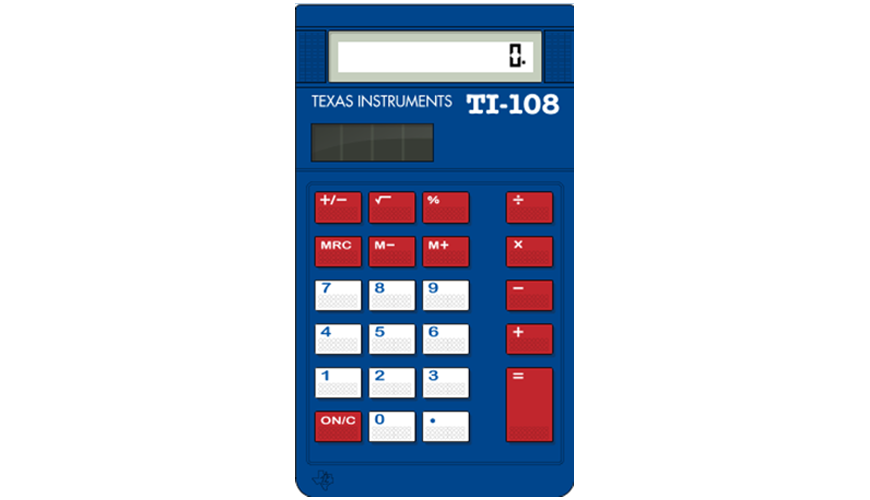
One unique aspect of UCAT QR is the on-screen calculator. This calculator is a basic four-function tool (addition, subtraction, multiplication, division) with no scientific functions. It’s there to help – but paradoxically, if overused, it can actually slow you down. Successful candidates learn to strike a balance between mental maths and calculator use, and to use the calculator efficiently when needed. Here’s how you can do the same:
Get Familiar with the On-Screen Calculator:
Don’t wait until test day to use the calculator for the first time. Its interface and behaviour might be different from calculators you’re used to. For example, it doesn’t allow typing long expressions all at once like a scientific calculator; you often have to do step-by-step calculations. Practice with the official UCAT practice tests, which simulate the real calculator. This will help you avoid being thrown off by the calculator’s quirks (such as the lack of a
%button or no memory for multi-step unless you use the M+ function). The more comfortable you are with its layout and limitations, the less time you’ll waste figuring out buttons during the real exam.Know the Keyboard Shortcuts:
Using your mouse to click the on-screen buttons for every number is cumbersome. Thankfully, you can type numbers directly with your keyboard (ensure Num Lock is on for the numeric keypad). There are also handy shortcuts: for example, Alt + C opens the calculator without having to click. You can use Alt + N and Alt + P to navigate to Next and Previous questions quickly, and Alt + F to flag a question – these save a bit of time and keep your hands on the keyboard. By memorising a few simple shortcuts, you streamline your workflow (imagine saving just 2 seconds per question by faster nav – over 36 questions, that’s over a minute saved!). Make sure to practice these shortcuts so they become second nature. (Note: On some browsers, the Alt shortcuts might not work in the practice interface due to conflicts, but they will work in the real test software.)
Use the Memory Function for Multi-Step Calculations:
The UCAT calculator has a memory store/recall (M+, MRC) feature. This can be extremely useful if you have a complicated calculation with multiple parts. For instance, suppose you need to calculate
(17.8^5) × 3. The calculator has no exponent button, so you’d have to multiply 17.8 by itself five times. Instead of writing down the intermediate result or risking retyping it, you could do this: enter17.8, pressM+(which stores 17.8 in memory). Then compute17.8 × 17.8by pressing17.8 × MRC(MRC recalls the stored 17.8) repeatedly to effectively do 17.8^5, and finally multiply by 3. While this may sound tricky, with practice it’s faster and less error-prone than writing intermediate results on the noteboard. If you find it confusing, you can absolutely do multi-steps the normal way (writing interim results), but it’s good to know the option exists. Tip: If you do use the memory, remember to clear it (ON/C button clears everything) before starting a completely new calculation to avoid accidentally using old values.Know When Not to Use the Calculator:
As stressed earlier, avoid the calculator for simple math that you can do faster in your head. Every time you open the calculator and click around, you’re using up valuable seconds. For example, calculating
15 × 17mentally (if you know 15×10=150 and 15×7=105, so total 255) is much faster than inputting those numbers on the calculator. Similarly, adding or subtracting small numbers or finding a 10% value is often quicker with mental arithmetic. Practise your mental maths: refresh your times tables up to 12 or even 20, practice quick addition/subtraction tricks, and memorise common percentage equivalents (e.g. 50% = half, 25% = quarter, 12.5% = 1/8). This will build your confidence to trust mental calculations for those easy cases.Use Estimation and Rounding:
If a calculation looks cumbersome, try estimating instead. For example, if you need to divide £123 by 1.4, you might estimate by dividing by 1.4 ~ (dividing by 1.4 is the same as multiplying by about 0.714). But an easier estimation: 1.4 is close to 1.5, and £123/1.5 = £82 (since 123 × 2/3 = 82). The real answer will be a bit more (because dividing by 1.4 gives a larger result than dividing by 1.5). If one answer option is around £88 and others are far off, your estimation might guide you. Rounding numbers to neat figures (10, 50, 100, etc.) can speed up mental math. Just be careful: if the answer choices are very close together, rounding might lead you to an incorrect answer. Use this technique when approximate answers are good enough – e.g. when answer options differ significantly or when you plan to narrow down options and guess. Always keep in mind whether you rounded up or down, as this indicates whether your estimate is slightly under or slightly over the true value. With practice, you’ll learn when estimation is “safe” and when a precise calculation is needed.
Practice with the Number Pad:
If you’re not already a touch-typist with the numeric keypad, practice entering numbers that way. It’s markedly faster than pointing and clicking digits on the screen. During your UCAT preparation, whenever you do QR practice questions on a computer, force yourself to use the keyboard (with Num Lock on) for calculations and navigation. This will build muscle memory, so during the real exam, entering numbers will be quick and almost subconscious.
In summary, view the calculator as a tool that must be mastered – not leaned on blindly. Combine its use with strong mental maths skills: use your brain for the quick stuff and the calculator for the tougher stuff. This balanced approach will help you speed through questions without sacrificing accuracy. By test day, you should feel comfortable switching between mental calculation, note-board scribbling, and calculator use as needed, like a triathlon athlete switching gears 🚴♂️🏃♂️🏊♂️.
Time Management and Pacing Strategies ⏱️
Time is everything in the UCAT, and Quantitative Reasoning is no exception. You have 26 minutes to answer 36 questions (excluding the 2-minute instruction screen), which is a blistering pace. But with smart tactics, you can make the most of those minutes. Here are some pacing strategies to ensure you maximise your score:
Aim for ~30 Seconds on Easy Questions:
As discussed, many questions can be done in well under the average 40 seconds. If you can answer a question in 20–30 seconds, do it and bank the extra time. That extra time will accumulate and allow you breathing room for the harder questions. A good rule of thumb is to finish the first pass of all questions a few minutes early, if possible. Medify’s tutors often suggest trying to get through all questions in about 24 minutes, leaving ~2 minutes to revisit flagged ones. This is tough, but it’s a target to train for. In practice, you might not always achieve that, but the idea is to push your pace on the straightforward items.
Skip or Guess the Time-Wasters:
The moment you identify a question as “complex” and likely to take too long, skip it (flag it for review). How do you identify these? Look out for questions that involve lots of reading, multiple conditional statements (“if this, then that, otherwise…”), or calculations that don’t have an obvious shortcut. For instance, a question that requires calculating a compound growth over 5 years with different rates each year is likely going to take time. It’s perfectly okay (and often wise) to hit Next and move on after spending only a few seconds to assess it. Flag it, so you remember to return if you can. Remember, every unanswered question at the end is lost points, so prioritize answering all the doable questions first. If time is nearly up and you still have flagged questions, guess on them rather than leaving blank – there’s no penalty for wrong answers, and you might get some right by chance. An educated guess (if you can quickly eliminate a couple of options) is even better than random.
Keep an Eye on the Clock (But Not Obsessively):
The interface has a countdown timer. It’s useful to glance at it periodically to gauge your pace. For example, after about 13 minutes, you ideally want to be around question 18 (halfway through 36 questions). One trick some students use is the “rule of three”: after roughly one-third of the time (≈8.5 minutes) you should be one-third through the questions (≈12 questions), and after two-thirds time (≈17 minutes) around question 24. If you find you’re significantly behind – say 10 minutes in and only on question 8 – that’s a sign to speed up and maybe start skipping more aggressively. Conversely, if you’re ahead of time, you can afford to slow down a tad on upcoming questions or double-check a calculation or two. Having these rough checkpoints can help you adjust your pacing on the fly.
Flag Strategically:
Use the flagging tool wisely. It’s not just for questions you skip; you can also flag questions you answered but aren’t 100% confident in, so you can revisit if time allows. However, don’t flag every single question – that defeats the purpose. A good strategy: flag the ones you skipped or guessed outright, and maybe flag any where you had to rush and would revisit if time permits. Near the end of the exam (or when the clock is running low), use the Review screen to quickly jump to flagged questions. But be mindful of time – don’t spend so long reviewing flagged items that you run out of time to at least guess any remaining unattempted ones.
Never Leave a Question Unanswered:
This bears repeating: there is no penalty for incorrect answers in UCAT QR. An unanswered question is automatically wrong, but a guessed question has some chance of being right. So, if you’re running out of time, quickly select answers for every question, even if purely at random, before the clock hits 0. It’s better to have a guess in each slot than to leave them blank. Obviously, aim to answer as many as possible, but for those you genuinely can’t complete, mark something. Many students in the past have managed a few extra marks just by quickly guessing remaining questions in the final seconds – those marks can make a difference in your scaled score!
Practice Under Timed Conditions:
Finally, the best way to improve your pacing is practice, practice, practice under timed exam-like conditions. Start by doing untimed practice to learn techniques, but as your test date approaches, do plenty of timed question sets and full mock tests. This will train you to feel how fast 40 seconds per question really is, and how to balance speed with accuracy. You’ll also become familiar with the mental pressure of the countdown. Over time, your mental arithmetic will speed up, and you’ll internalise shortcuts and common patterns, making you naturally faster. The experience from practice will help you stay calm during the actual exam, since you’ll have a solid sense of when to move on and when you can afford a few extra seconds on a tricky problem. The goal is to make your pacing second nature by test day.
By employing these time-management strategies, you can confidently navigate the QR section without panicking about the clock. Remember, pacing is a skill – it improves with intentional practice. Combine good pacing with the mathematical strategies discussed earlier, and you’ll be in a strong position to maximise your UCAT Quantitative Reasoning score. ⏳💯
Final Tips for UCAT QR Success 🎯✅
Before we wrap up, here’s a concise list of top tips to keep in mind as you prepare and when you’re sitting the QR section. These are habits and strategies of high-scoring candidates:
✅ Know the question formats:
Be comfortable interpreting tables, graphs, charts, and other data visuals under time pressure. Always read the question first, so you know what to look for in the data. Don’t get lost in unnecessary details.
✅ Brush up on basic maths:
Review key GCSE-level maths topics (percentages, ratios, averages, unit conversions, etc.) and practise them until you can do them quickly. The maths itself isn’t hard – it’s the speed that matters. Sharpen your mental maths for common calculations (like fractions, times tables, simple percentages).
✅ Use the calculator wisely:
The on-screen calculator is useful for long or tough calculations, but avoid it for simple maths you can do faster mentally. Learn the calculator’s quirks and shortcuts (e.g. Alt+C to open it, use the number pad for entry, M+ and MRC for memory) ahead of time. Practice so that using it feels natural.
✅ Minimise calculations – think strategically:
Always seek the shortest path to the answer. That might mean using estimation or logic instead of brute-force math, or plugging in answer options to see which one fits. Remember, the UCAT rewards correct answers, not showing work, so be clever in your approach.
✅ Manage your time aggressively:
Aim to solve easy questions in under 30 seconds to save time for harder ones. Skip and flag questions that seem very time-consuming; come back if you have time. Never let one question steal time from three others. Keep moving and don’t dwell too long on any single item.
✅ Avoid common traps:
Read carefully to use the right data, perform all required steps, and watch out for unit mismatches. The test often includes tempting wrong answers that match a typical mistake, so double-check things like “Have I answered exactly what was asked?” and “Do the units match?” before you click an option.
✅ Guess rather than omit:
If you’re truly stuck or time is nearly up, make an educated guess and move on. There’s no penalty for guessing, and you might score a point even on a question you couldn’t fully solve. Leaving it blank guarantees zero points.
✅ Practice under exam conditions:
Simulate the test environment when you practice – use a timer, use the online calculator, and practise with noise or stress if possible. The more you simulate, the less intimidating the real exam will feel. Practice is the only way to improve speed and accuracy. Analyse your mistakes from practice to learn and avoid them in future. Consistent practice will build your confidence and performance in QR over time.
By following these tips and strategies, you’ll develop a tactical approach to the Quantitative Reasoning section. Remember to stay calm and focused during the exam – a cool head will help you think clearly and avoid errors, even under pressure. You’ve got the knowledge and the tools; now it’s about execution and practice. Good luck, and happy calculating! 🎉👏
References 🔗
UCAT Consortium – Official Test Format and Scoring: Overview of UCAT subtests, timing (QR: 36 questions, 26 min) and skills assessed.
UCAT Consortium – Official Test Tools: Details on the on-screen calculator and keyboard shortcuts for navigation.
Blue Peanut (Medical Prep) – UCAT Quantitative Reasoning Guide 2025: Key data formats, maths topics, and tips for efficient solving and skipping questions.